How to create free website with blogger, Free Blog website कैसे बनाये?
If you have a passion for writing and you want to create your own blog or website, but you do not want to spend money for it. Then you can create your website on Blogger.
There is no need to buy domain and hosting services to do this. Through this, you can create your website for free.
Let us tell you that this service is given free to all people by Google. If you want to know all the information about it in detail, then read our today’s article completely.
In this we will tell you step by step the process of creating a website on blogger for free.
1.First login to blogger.com:-
For this first of all type
http://www.blogger.com/home
Here now sign in with your gmail id and password. If you do not have a gmail account then you should create it. Because without this you will not be able to create a website on blogger. If you do not have a gmail account, then you can go above You can create your account by clicking on the Sign Up button given in the right corner. Let us tell you that Blogger is associated with Google, so it is necessary that you have a Gmail account.
When your Gmail account is created, you will see a screen like the one below
2.Confirm your profile:-
When you will into blogger then you will find a link there continue to blogger click on that
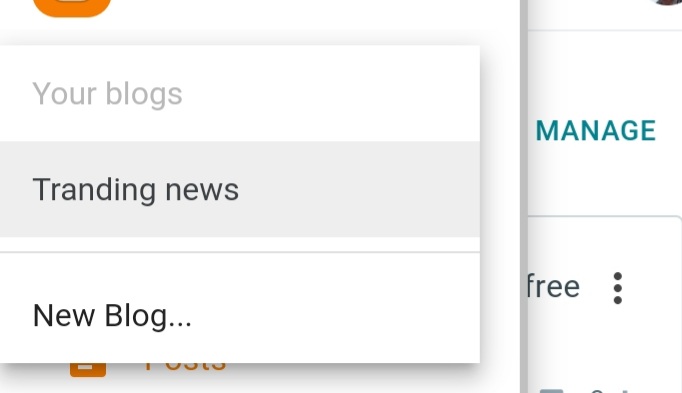
Now create new blog
Now you can create your own website and for this click on new blog on the left side
Website domain & Title name:-
After that you have to provide the domain and title name of your website. Suppose if you want to make a website for entertainment,
then your domain name and website URL can be
entertainment.blogspot.com or newsentertainment.blogspot.com.
Now create a name on which niche or topic you want to make your blog as your convince
We want to tell you that as your choice you make a website name qnd after that blogspot.com will be automatically add in your website ,we have a suggestion that try to make same website name that belongs to your niche or topic.
Keep in mind that your domain name should be unique. Many times it happens that someone else has already taken the domain name you hear. Therefore in such a situation it is necessary that you have a different part of your domain. Keep the name. Let us tell you that when the blue tick appears in the address field, then you understand that your domain name is available.
Now you click on the SAVE button and after doing this your blog will be created.
In this way again you have to select the template after selecting the domain name. You can choose any template at this time. For this you click on THEME option and then you install the theme you want. Keep in mind that there are not many options in blogger.
Start blogging:-
when you will click on create blog then your website be created and now you can create your bolgs and posts accordingly to your niche or topic and start your journey to earn money online free of cost and also show your talent with your writing skills.
Now visit your website:-
Now you can enter your website name in browser and vist your website may be possible you will see blank page there and if you don like layout then you make it attractive through your creativity and using othet things that i will also learn you.
Publish your post on blogspot website:-
After successfully creating the Blogspot website, you can publish the article on it. Let us tell you that you have to write the title of the post before writing it. When you write your content, after that enter the title and press the publish button. Here Let us also inform you that when you press the publish button, you will be asked to share your article on Google+. If you want, you can share your post there.
Set required permalink on blogspot:-
Now you must be thinking that what is permalink? So let us inform you that this is a link that you have to enter in your article or post. In simple language, this is an address that can be entered and your post can be seen in the browser.
In this way, when you write a post, you have two options for permalink such as –
Automatic permalink – This is an automatic permalink that Blogger generates automatically. Let us tell you that it creates this link based on the title of the post you have written.
Custom permalink – You have to put custom permalink in the sidebar. Let us tell you that while generating it, you have to use hyphen (-) in the middle of lower case words.
Change the look of your website:-
If you want to change the look of your website then it is very easy. Let us tell you that you can do it very easily by changing the template. So click on the template for this, after which you will get a lot of collection of templates. You can choose any one of them and click on the apply the template button. In this way you can easily change the look of your website.
Download existing template backup and upload new template to blogger:-
To download the existing template backup, you have to follow the following procedure-
First you have to go to My blogs. Here you will see a backup/restore button, click on it. Now it will ask you to browse the new template or you can download the existing template.
Find Free Templates Outside of Blogger :-
If you do not like any of the templates in the Blogger library, then you can download the template from another website. For information, let us tell you that for this you can take a template from http://btemplates.com/. Apart from this, you can also search by writing free bloggers template on Google. Then select the template and download it in zip file format. Now extract that zip file in the folder. This way you will get an XML file. You will need this file while uploading the template to Blogspot.
upload new template:-
To upload a new template, you have to click on the back up/restore button. You will find this option at the bottom of the screen. From here you can download the backup of the existing template and also upload a new template. For this you browse the XML file and then click on the above upload. Now it will ask you for the widgets then click on keep widgets .
Change the look of the navigation bar:-
For this, you go to the layout section from the sidebar and click to edit the Navbar section there. From here you can select and save the style or look that you like.
How to add Favicon add in website:-
For information, let us tell you that Favicon is a very small image that appears in the browser tab when you open any particular website. So to change the default blogspot Favicon you have to follow the following process –
Layout >> Edit Favicon
Here select a square image whose size is less than 100 KB and then upload it. Keep in mind that whenever you make any changes in the layout section, always save it after change
You can add gadgets from the sidebar of your blog. For this, you can go to the layout section and press the button of add a gadget. In this way, a window will come in front of you from where you can add gadgets. Change whatever setting you want. Do save it.
create custom domain
We told you above how you can create a website on blogspot for free. But the name of blogspot is associated with it. In such a situation, if you want, you can also buy the domain of your choice. and then go to basic. Now you click on add a custom domain. In this way add the domain you have purchased.
Traffic stats for website
You should know about the real time traffic status coming to your website. You should have as much information as possible about whatever audience comes there. For this, go to the stats and press the overview button. This will give you all the traffic. The data will be known.
If you are new to this field then you might not be aware of it. This may be a new thing for you. But let us tell you that robot.txt is a file. For this you have to first go to the settings. And after that press the button of search preferences. After that you have to select yes in its setting. After that save whatever changes you have made.
Editing HTML
To edit HTML, you have to go to the template and go to the section of edit html there. Now you can do whatever editing you want to do here. Let us tell you that you can change the script by going to the header footer section.
Monetize your website
Now everything is completely set up and your website has become like a professional website. Now you can do blogging. In this way traffic will start coming here, after that you can apply for Google AdSense. Will get approval after that your earning will also start.
Conclusion
In this article, we told you how you can create your own website on Blogger for free. Whatever information was necessary for this, we told you which would have been very helpful for you. If you liked this information, then give it a try. Do share with other people also.
 tranding news
Leave a comment